
Managing more than one Facebook account has become a common need for marketers, business owners, and even everyday users. But Facebook's rules can feel confusing, and violating them can lead to restrictions or even a permanent ban. If you want to safely run multiple Facebook accounts without getting flagged, this guide breaks down everything you need to know—clearly and honestly.
Note: Some users choose to separate accounts by using tools, such as AdsPower antidetect browser, that create isolated browser environments to avoid unintentional linking. These tools help maintain distinct sessions, but their use should still align with Facebook’s policies and legal requirements.
Can You Have Multiple Facebook Accounts?
Short answer: Facebook technically allows only one personal account per individual, according to its Terms of Service. The platform wants every person to use one real identity, tied to their real information.
But here's where many users get confused:
- Facebook allows multiple Pages
- Facebook allows multiple Business Manager accounts
- Facebook allows multiple ad accounts
- Facebook allows teams or agencies to manage many accounts, as long as each belongs to a real person
So while you can only have one personal profile, you can still run Facebook accounts for clients, manage multiple business assets, or operate several projects, if you do it correctly.
Where users get into trouble is when they create and operate multiple personal profiles for themselves without proper separation. Facebook's automated systems often detect this and flag the accounts.
This is why many people look for ways to keep accounts safe, separated, and compliant.
Why Do People Need Multiple Facebook Accounts?
People search for "multiple Facebook accounts" because they have real operational needs. You may fall into one of these groups:
1. Social Media Managers
Agencies and freelancers often manage Facebook accounts for clients. You cannot log in from the same browser session or IP without risking account linking.
2. E-Commerce and Dropshipping Businesses
Sellers often need:
- Backup accounts
- Multiple ad accounts
- Accounts for product testing
When an advertising account gets restricted, their entire business pauses. So redundancy becomes important.
3. Affiliate Marketers
Affiliate marketers often separate niches. One account for crypto. One for Nutra. One for giveaways. One for personal relationships.
4. Privacy-Focused Users
Public figures, teachers, and community managers often prefer not mixing personal life with professional communities.
5. Team Operations
Businesses with multiple departments may need separate logins for branding, customer support, or advertising.
These needs are real, but they must be handled correctly to avoid violations.
Is It Safe to Have Two Facebook Accounts With Different Emails?
You can create two Facebook accounts with two different emails. But "can I have two Facebook accounts with different emails?" is not the same as "is it allowed?"
Here's the truth:
1. Facebook Allows Different Emails
Technically, the system lets you create accounts using different emails and phone numbers.
2. Facebook Does Not Allow One Person to Have Multiple Personal Accounts
This is part of their authenticity policy.
3. Facebook Can Detect If the Same Person Runs Them
Even if the email is different, Facebook detects:
- Device fingerprints
- Browser environment
- IP address
- Behavior patterns
- Login habits
This means simply having two emails is not enough. If Facebook thinks the same person owns both accounts, they may restrict or ban them.
So yes, you can create two accounts. But no, it isn't safe if both profiles belong to you, and you don't isolate them.
Facebook Policies You Must Know Before Running Multiple Accounts
If you want to run Facebook accounts safely, you need to understand the policies that affect multi-accounting.
Facebook Requires Real Identity
Your personal account must represent who you are. Fake names, fake images, and fake IDs violate policy.
Facebook Allows One Account Per Real Person
This is non-negotiable.
Facebook Does Not Like Suspicious Login Activity
Logging into many accounts from the same IP, browser, or device is the biggest red flag.
Facebook Blocks Risky Patterns
These include:
- Creating many accounts from the same device
- Switching between accounts without clearing fingerprints
- Logging in from shared hotel or office Wi-Fi
- Using VPNs that recycle IPs
- Behavior that looks automated
If you're not careful, Facebook may force ID verification or disable accounts.
Why Facebook Blocks Multi-Accounting
Facebook has strong fraud-prevention systems. They detect multi-accounting through:
1. Device Fingerprinting
Your device has a unique combination of:- Screen size
- Canvas fingerprint
- WebGL
- Timezone
- Audio fingerprint
- Fonts
- Hardware information
When accounts share these fingerprints, Facebook assumes they're linked.
2. IP Address Patterns
If many accounts log in from the same IP or geographic location, that's a red flag.3. Browser Environment
Chrome profiles, extensions, and stored cookies can reveal connections between accounts.4. Behavior Signals
Activities performed too quickly or too frequently may appear suspicious to Facebook’s automated systems.
These systems exist to fight spam, fake accounts, and bots. But they also affect legitimate users and businesses trying to run multiple Facebook accounts for work.
How to Safely Run Multiple Facebook Accounts (Best Practices)
You can run multiple Facebook accounts safely if you follow best practices and respect Facebook's rules. Here are the safest ways to stay compliant:
1. Keep Accounts Completely Separated
This means:
- Separate browser profiles
- Separate cookies
- Separate devices or isolated environments
- Separate phone numbers
- Separate emails
2. Use Stable, Dedicated IPs
Avoid:
- Free VPNs
- Shared proxies
- Mobile hotspots
Use high-quality residential or mobile proxies if needed.
3. Don't Switch Accounts From the Same Browser
This is one of the fastest ways to get accounts linked.
4. Warm New Accounts Slowly
Don't rush:
- Friend requests
- Group joins
- Ad account creation
- Page creation
Act like a normal human.
5. Don't Use Identical Passwords, Names, or Patterns
Facebook's systems look for similarities.
6. Use Business Manager Whenever Possible
It's the official way to manage assets.
7. Use an Antidetect Browser When Scaling
This is the safest method when handling many accounts or preventing Facebook from linking environments.
Managing Multiple Facebook Accounts With Antidetect Browsers
For users who need to operate multiple Facebook accounts—especially at scale—an antidetect browser can help keep account environments separated. These tools create distinct browser profiles so that each account runs in its own isolated environment, reducing the chances of accounts being linked through shared fingerprints or device data.
By separating elements such as fingerprints, cookies, IPs, and hardware characteristics, antidetect browsers simulate individual devices for each profile. This setup can be useful for agency work, eCommerce operations, or other scenarios where accounts must remain independent.
Why Antidetect Tools Are Commonly Used for Multi-Accounting
Antidetect browsers are often chosen for multi-account workflows because they offer features designed to keep each environment separate:
- Unique Browser Fingerprints
Each profile can generate its own fingerprint, reducing the likelihood of accounts appearing connected. - Complete Browser Isolation
Sessions, cookies, and browsing data remain separate for every profile. - Proxy Compatibility
Users can bind dedicated proxies to profiles to maintain consistent IP locations. - Organized Workflows
Teams can manage multiple accounts without overlapping environments. - Optional Automation Tools
Some antidetect browsers support automated actions such as posting, warming accounts, or checking messages. - Scalability
These tools are designed to handle both small setups and larger teams managing many profiles at once.
Users typically evaluate different antidetect browsers based on their workflow needs, security considerations, and the level of isolation required.
Steps to Manage Multiple Facebook Accounts Using an Antidetect Browser
Here’s a general workflow that users often follow when setting up multiple Facebook accounts in isolated environments:
1. Create a New Browser Profile
- Open your chosen antidetect browser tool and create a new profile.
- Assign a profile name for easy tracking.
- Specify the operating system and user agent.
- Configure tags or organizational labels to keep profiles organized.
2. Bind a Dedicated Proxy
- Assign a stable residential or mobile proxy to the profile.
- Enter the IP details and authentication credentials.
- Test the connection to confirm it is working properly.
- Save the configuration once validated.
- Use a dedicated IP for each account to maintain consistency.
3. Select the Platform
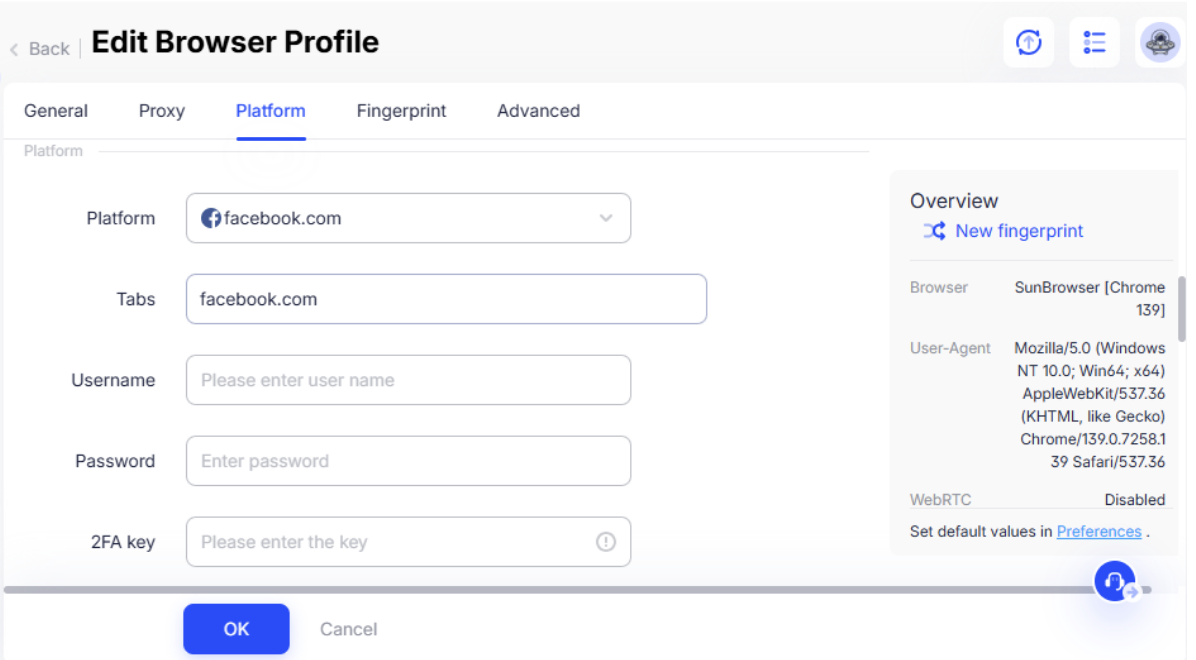
Add the login information for the Facebook account within the platform’s account management section, if the tool includes one.
4. Configure the Fingerprint
Adjust fingerprint settings (or use the default configuration) to ensure the browser profile behaves as a unique environment.
5. Launch the Browser Profile
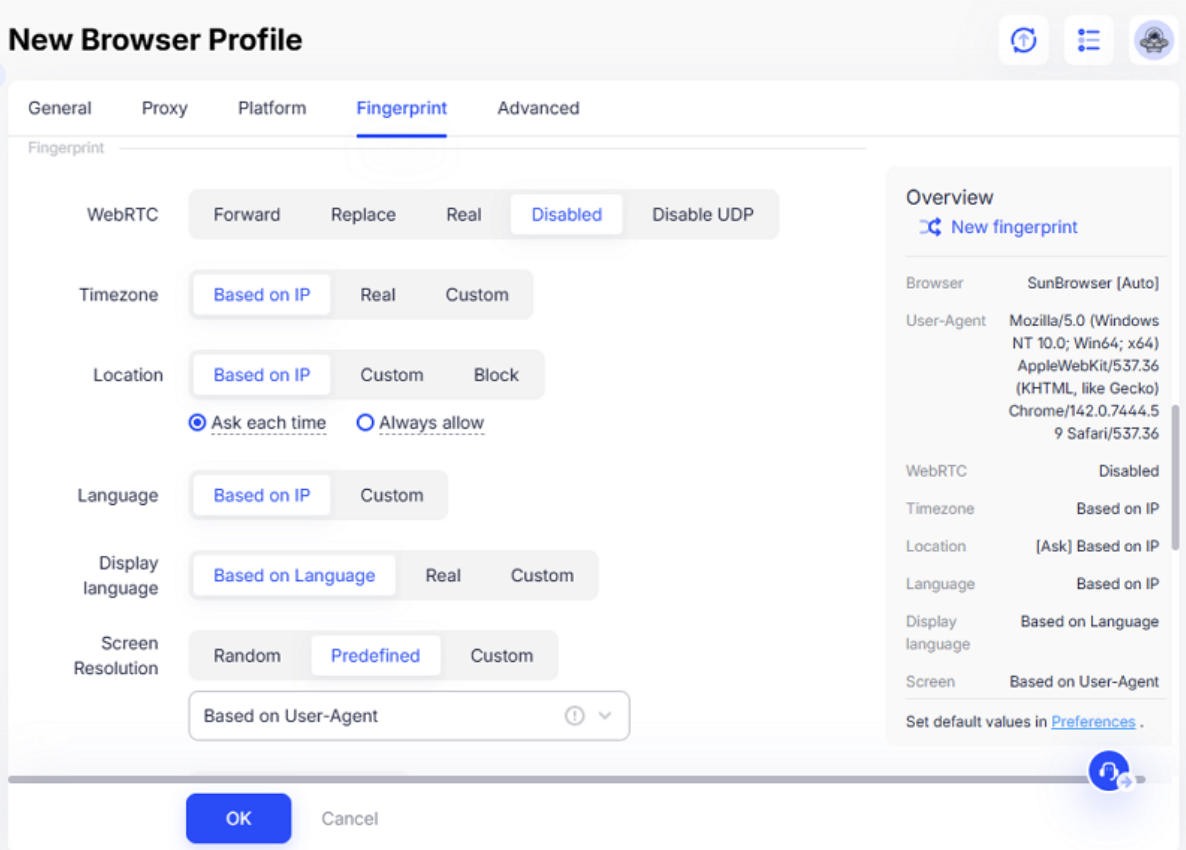
Open the isolated browser session assigned to the profile. This environment functions like a separate device with its own settings.
6. Maintain Account Health
- Use one profile per Facebook account to avoid overlap.
- Maintain consistent IP locations for each account.
- Avoid sudden or large geographic changes that may trigger security checks.
- Limit automation to prevent behavior from appearing unnatural.
- Use each account in a natural, human-like manner.
7. Repeat for Additional Accounts
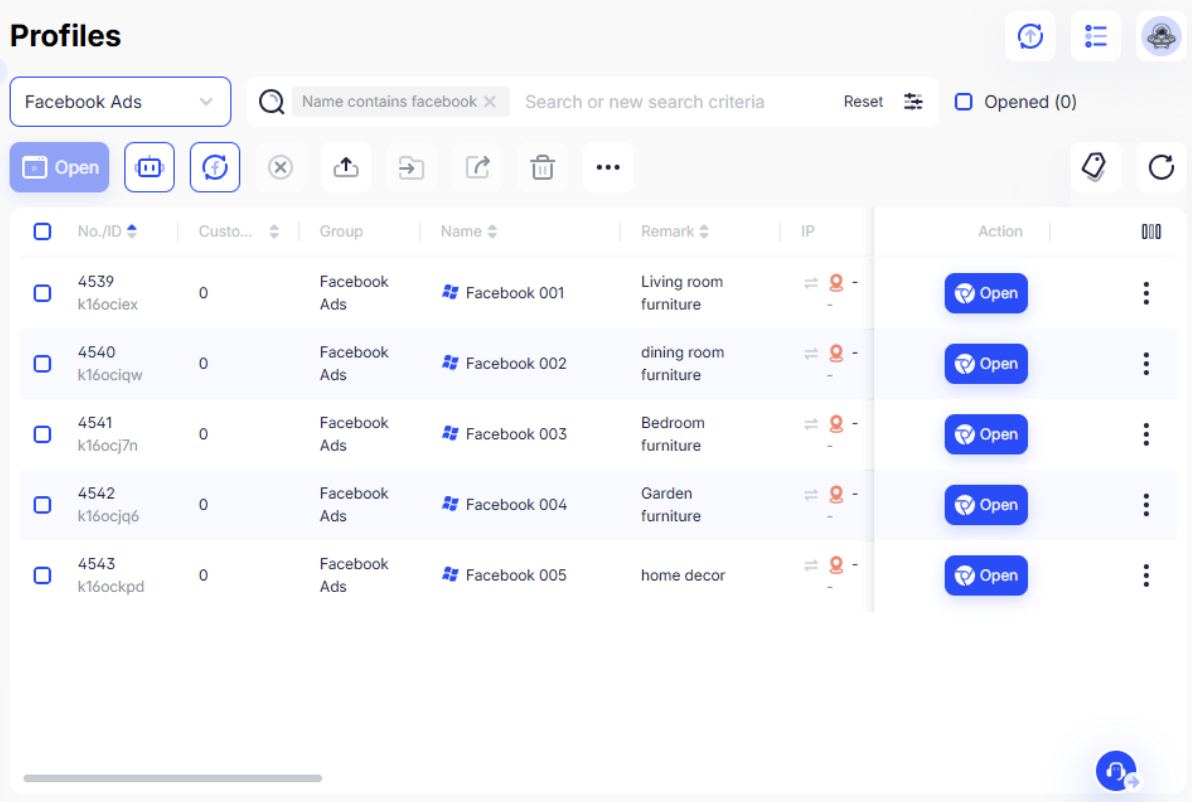
Create a separate browser profile for every additional account. Profiles should never be mixed or reused across different accounts.
Following these practices helps reduce the likelihood of Facebook detecting linked activity and minimizes the chance of account restrictions.
While Facebook allows only one personal profile per individual, many users operate multiple accounts for professional or organizational purposes. The key is maintaining compliance, avoiding suspicious login behavior, and ensuring that each account remains isolated.
If you need more information about Facebook’s rules regarding accounts, authentication, and identity, consult the official Meta documentation to ensure all activity aligns with platform policies.
Conclusion
Managing multiple Facebook accounts can be done safely, but only when users understand the platform’s rules and follow proper account-management practices. Facebook permits organizations, teams, and professionals to work with multiple business assets — but it does not allow one person to maintain multiple personal profiles. Because Facebook relies on device data, IP patterns, and behavioral signals to detect linked accounts, keeping environments clearly separated is essential.
For users who must manage several accounts for work, such as agencies, eCommerce sellers, or community teams, maintaining proper isolation, using consistent login environments, and avoiding suspicious behavior are key to reducing the risk of account restrictions. By following Facebook’s policies, keeping activity natural, and ensuring each account is managed responsibly, users can work effectively without putting their assets at risk.
Disclaimer
The information in this article is provided for general educational purposes only and does not constitute legal, compliance, or security advice. Facebook’s policies, detection systems, and enforcement practices may change at any time, and users are responsible for ensuring that their activities comply with Meta’s official Terms of Service, community standards, and all applicable laws.
Any tools, workflows, or technical methods mentioned in this article are described solely for informational purposes and should not be interpreted as endorsements or recommendations. Using third-party software or account-management tools does not guarantee safety from account restrictions or enforcement actions.
iplocation.net is not liable for any damages, losses, account limitations, bans, or compliance issues resulting from the use or misuse of the information provided in this article. Users should always consult Meta’s official documentation and seek professional guidance when managing multiple accounts or implementing account-separation strategies.
Featured Image by Freepik.
Share this post
Leave a comment
All comments are moderated. Spammy and bot submitted comments are deleted. Please submit the comments that are helpful to others, and we'll approve your comments. A comment that includes outbound link will only be approved if the content is relevant to the topic, and has some value to our readers.
Comments (0)
No comment