

Famous.ai focuses on speed and clarity, generating full web, mobile, and Web3 apps from a single natural language prompt. It produces real UI, logic, and backend structure, then lets you refine everything through simple instructions. Famous.ai is a no-code AI app builder that enables you to create complete applications quickly, making it a strong option for teams and creators who want to build and publish without writing code.
Pros and Cons
Pros
- Full-stack generation from a single prompt
- True no-code experience suitable for beginners
- Natural language editing that really works
- Native publishing to iOS, Android, and Web
- Web3 support is built into the workflow
Cons
- Free plan is limited to small builds
- Complex enterprise logic can require extra refinement
- Prompting skill influences quality
Platform Specs
| Feature | Details |
|---|---|
| Starting Price | Free plan available. Paid plans start at 7 dollars per month |
| Best For | SMBs, startups, creators, agencies, and teams building without developers |
| Main Capability | Natural language full-stack app generation |
| App Types | Web, mobile, and Web3 applications |
| Publishing | One click deploy to Web, iOS, and Android |
| Web3 Support | Smart contracts, wallets, token logic |
| Editor Type | Split view layout with live code and real-time UI preview |
| Collaboration | Checkpoints, team access, and multi-project workflows |
| Code Access | Full code transparency with export options |
| Build Modes | Regular, Bulldozer, and Genius tiers |
| Use Cases | AI app builder, AI mobile app builder, landing page generator, internal tools, dashboards, SaaS MVPs |
How the Platform Works
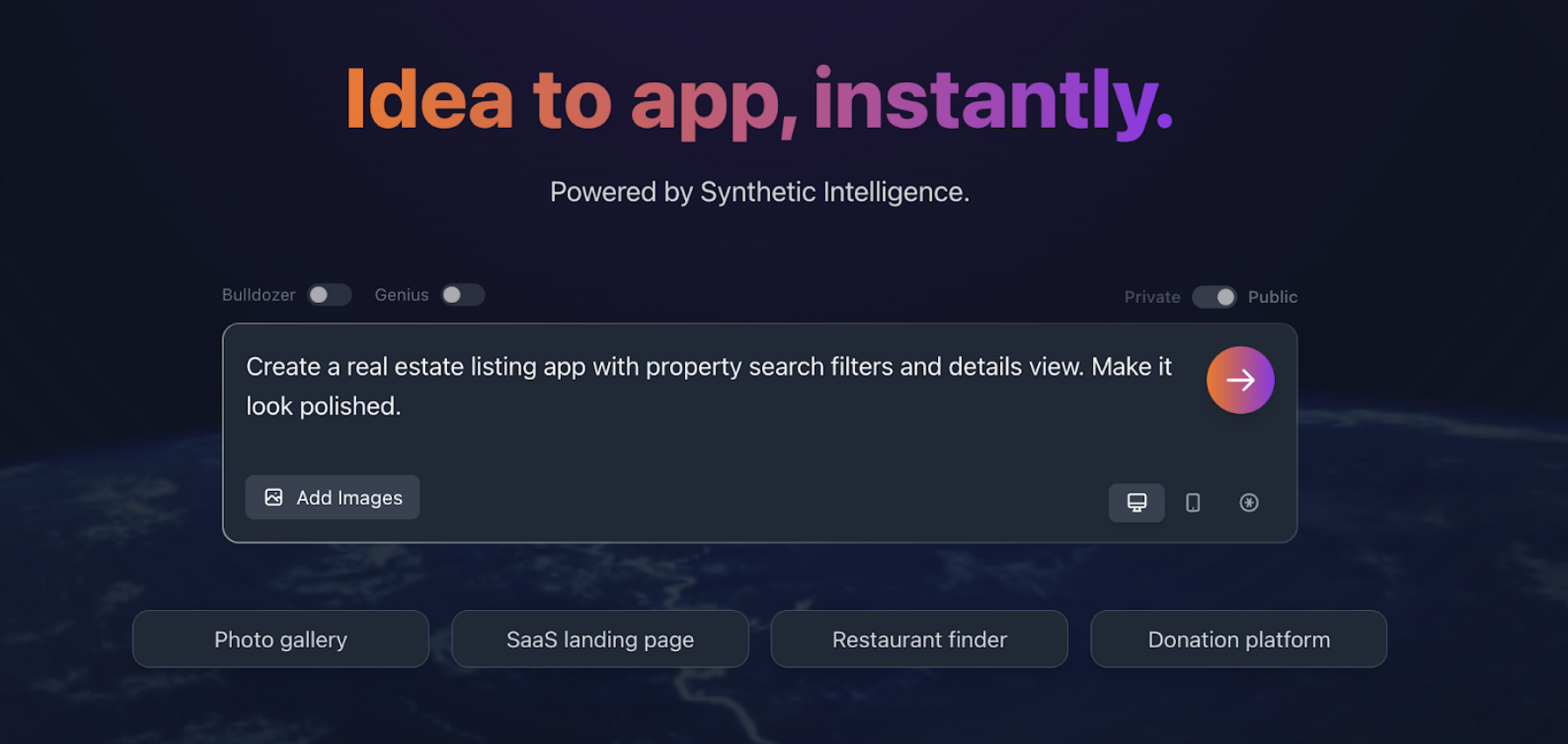
Famous.ai builds apps the way experienced app creators think. You describe what you want in plain English, and the system produces an entire application with real, usable logic. When you enter your idea, the platform builds the UI, backend, components, routing, models, and workflows in a single continuous flow. This is not a mockup generator. It creates real software that you can preview, test, export, or publish. It also reveals the live code for every component. As someone who is used to switching between Figma, VS Code, Supabase, and various integrations, the time saved here is enormous.
Getting Started
- Account setup: The platform begins with a free account option, which includes one small build per day for testing simple concepts.
- Starting a project: Users enter an idea in natural language. For example: “Build a habit tracker with daily logs, calendar view, simple charts, login, reminders, and a dark theme.”
- Build mode selection: The tool offers different build modes. Free accounts use the regular builder, while paid plans unlock Bulldozer and Genius modes.
- Workspace layout: The editor uses a three-panel interface with prompts on the left, code in the middle, and a real-time preview on the right.
- Build generation: Once the idea is submitted, the system generates the app structure within minutes.
- Iteration: Refinements and edits are made through additional natural language instructions.
Key insight: As someone who has used many builders, the speed here is the real unlock. Most complete apps are ready in under five minutes.
What the AI Actually Builds Behind the Scenes
From the moment you enter your request, the system generates:
- Authentication
- Database structure
- Routing
- Screen layout
- Component hierarchy
- Business logic
- Input validation and workflows
This is closer to having a junior developer on call rather than a template system. I have tested it with dashboards, booking systems, onboarding flows, Web3 wallets, simple SaaS tools, and internal utilities. Each one produced a working prototype that needed far less manual correction than expected.
Editing, Improving, and Iterating
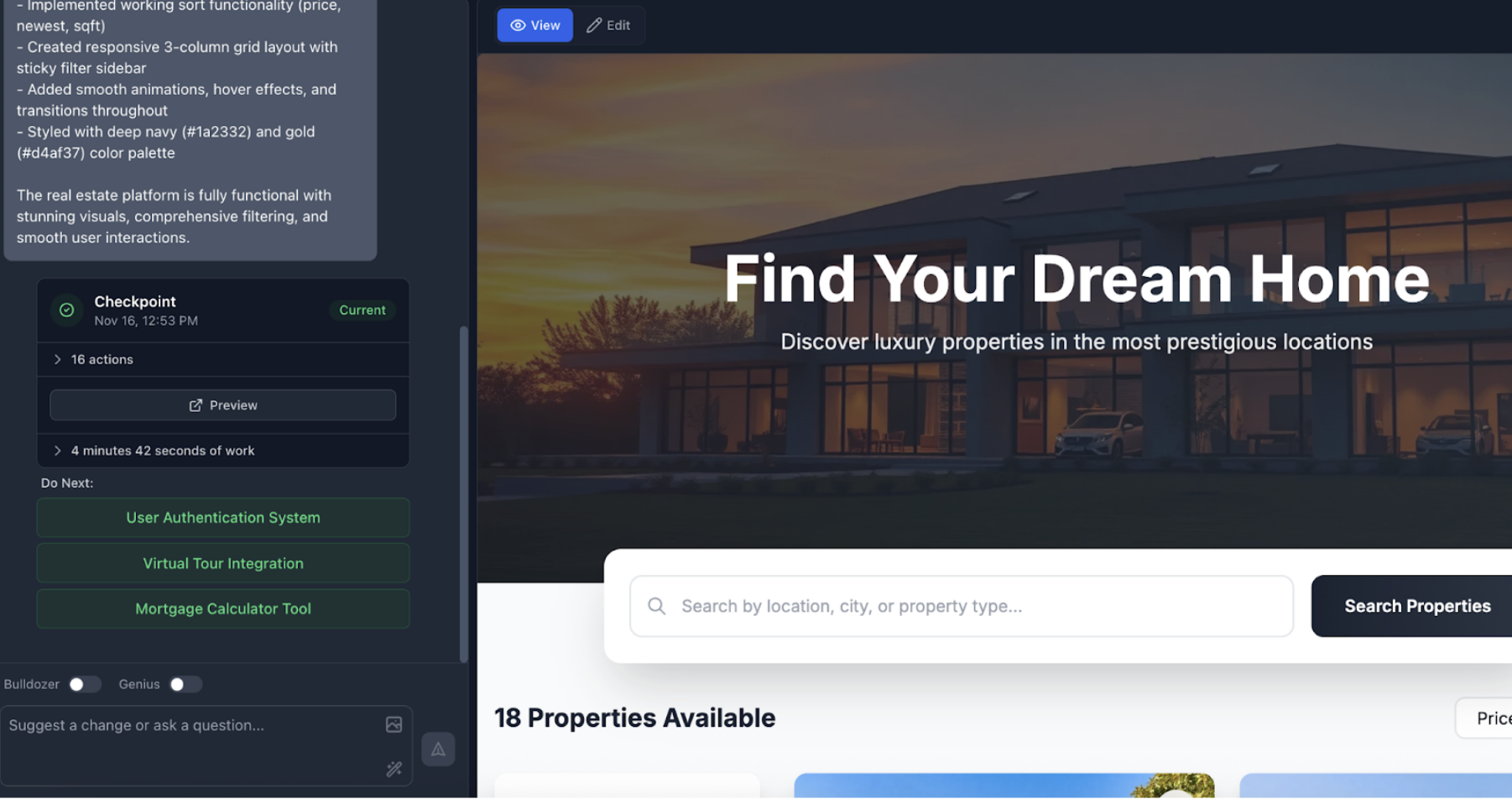
The platform's iteration flow is one of the platform's best features. You simply explain:
- “Add a settings page with profile image upload and timezone selection.”
- “Make all buttons rounder and switch the color scheme to teal.”
The platform instantly updates the UI and code.
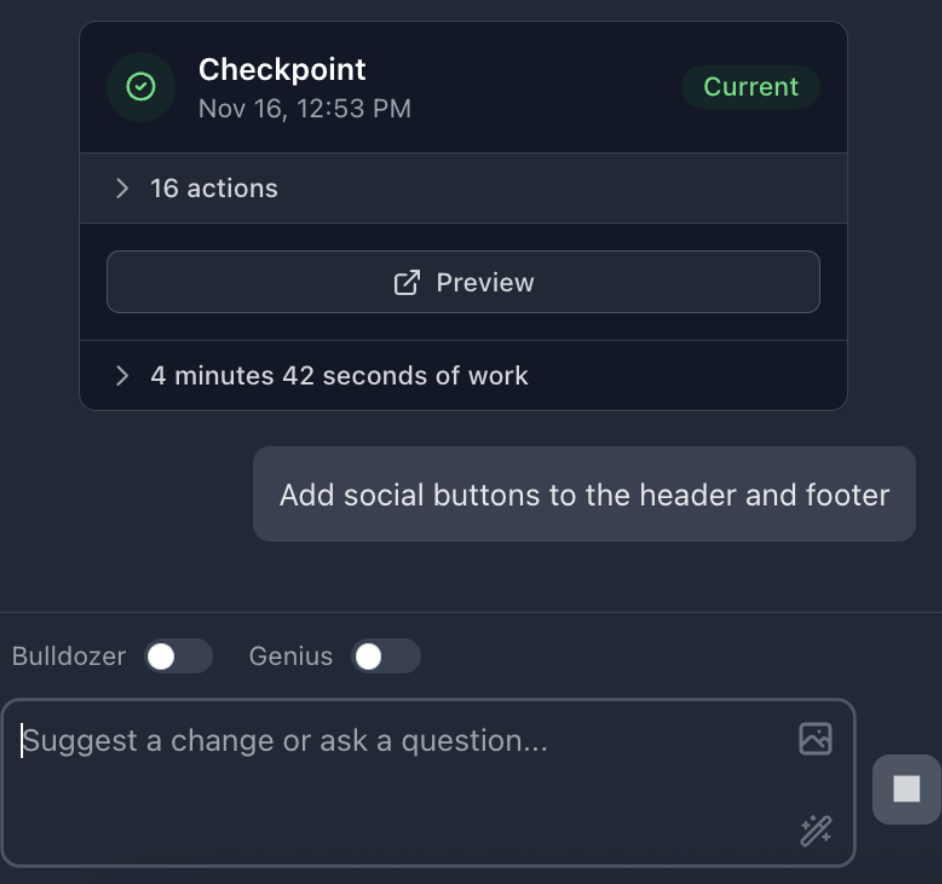
Every version creates a checkpoint that you can revert to, so there is a breadcrumb trail of your work. This resembles a lightweight version control, which is great for teams. Screenshots of the checkpoint system usually help stakeholders understand the editing flow.
Device Preview and Responsive Testing

You can switch between desktop, tablet, and mobile views in real time. This is essential for mobile app developers and makes the workflow much smoother than hopping into separate preview tools. It allows for quick corrections before publishing and ensures layouts behave well on smaller screens.
Deployment and Publishing Options
This is where the platform separates itself from typical no-code builders.
- Web apps deploy instantly.
- iOS and Android builds can be published directly from the platform.
- Web3 apps can launch smart contracts and integrate wallets.
You are not relying on wrappers or external services. As someone who has published apps before, this cuts several layers of complexity.
Pricing Overview
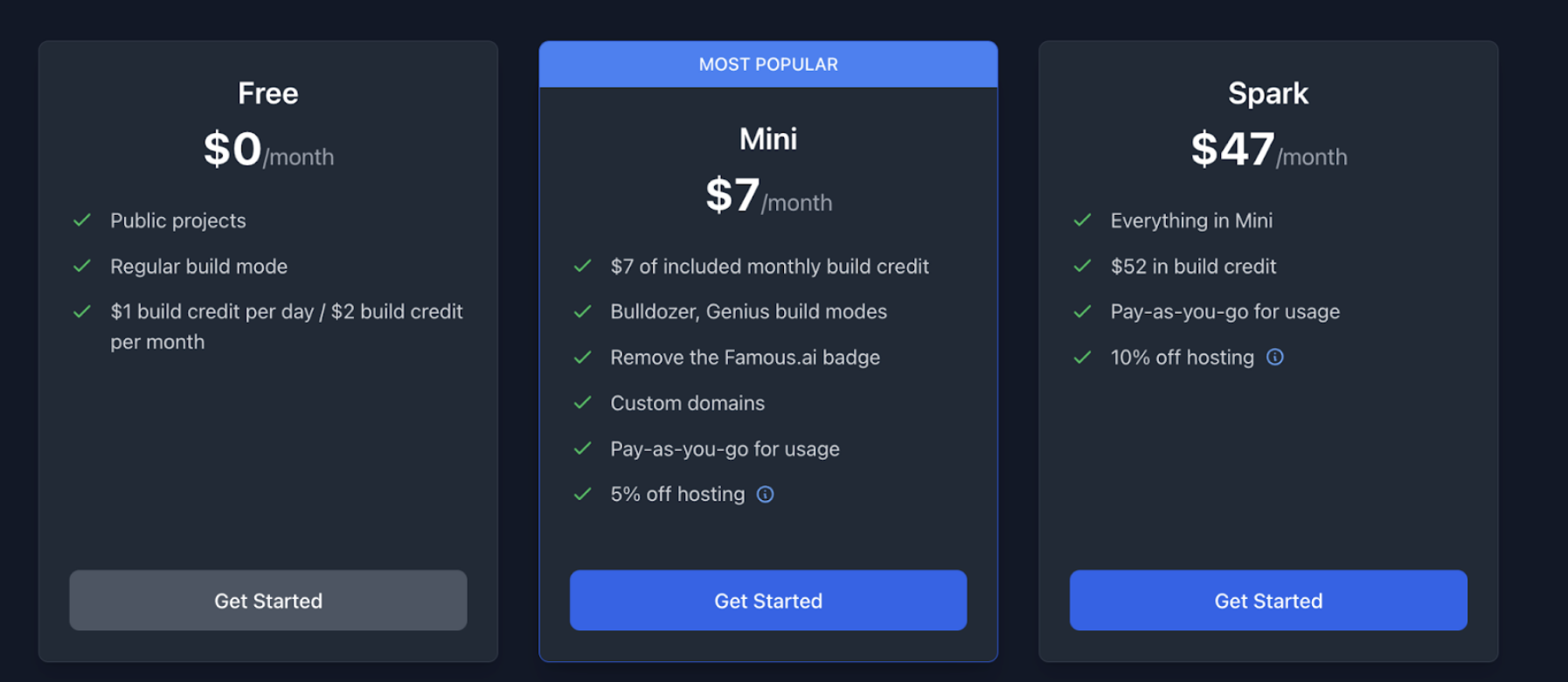
Famous.ai pricing is credit-based and starts with a free tier. The mini plan at $7 removes the watermark and adds support for custom domains. Higher plans offer:
- More credits
- Bigger builds
- Faster processing
- Extra publishing features
- Team collaboration
The higher tiers are used mainly by agencies or power users who frequently build apps.
Project Management and Collaboration
You can organize multiple builds from the dashboard, switch between them, and track each checkpoint. Team access allows multiple editors to contribute. This makes the platform better suited for ongoing development rather than one-time prototypes.
Is Famous.ai Worth It? My Honest Take
If your goal is to ship fast without learning to code, the platform delivers. As someone who has tried everything from Bubble to Glide to Webflow to custom React deployments, Famous.ai fills a gap that has existed for years. It gives beginners a real path to building working apps and lets experienced builders move at a pace impossible with traditional methods. Once you get comfortable with prompting and the editor flow, you can build real, publishable apps in minutes rather than weeks.
 FAQs
FAQs
You can start with the free plan, which includes small builds. Paid plans begin at 7 dollars per month and scale based on usage, build size, and publishing needs.
Yes. The platform supports direct publishing to iOS and Android, as well as instant web deployment. There is no need for external wrappers or extra services.
You can build web, mobile, and Web3 apps. Common examples include dashboards, booking tools, landing pages, internal systems, onboarding flows, SaaS MVPs, habit apps, and simple utilities.
No. The platform is designed as a no-code AI app builder. You can refine layouts, logic, and workflows using natural language. Access to the whole codebase is available if you want to review or export it.
The platform is designed for SMBs, startups, creative teams, agencies, and individual creators who want to build functional software quickly without hiring developers or managing complex infrastructure.
Share this post
Author

Read the latest articles from Jeff Broth
5 Signs Your Website Traffic Is Being Hijacked via Hidden Redirects

November 10, 2025
Attracting visitors to your site is one of the hardest things in business. It takes time, money, consistency, and a lot of planning sound SEO and content marketing. Now imagine if all of that effort goes to waste and users are redirected elsewhere before they even land on your site.
Learn moreCrypto Wallet Custody, Support, and Security Explained for Beginners

September 8, 2025
Crypto is in its heyday, and even beginners can appreciate the ability to send and receive assets at the speed of light, without borders, and peer-to-peer. Bitcoin’s bull cycle is expected to remain intact, with the flagship cryptocurrency delivering several all-time high closes in July 2025 alone. With more su [...]
Learn moreLeave a comment
All comments are moderated. Spammy and bot submitted comments are deleted. Please submit the comments that are helpful to others, and we'll approve your comments. A comment that includes outbound link will only be approved if the content is relevant to the topic, and has some value to our readers.
Comments (0)
No comment